




• English
  • 中文
  • Français
  • Deutsch
  • Español
Contact Us
Home
Email
Follow Prosoft Technology on Twitter
Follow Prosoft Technology on Facebook
Follow Prosoft Technology on LinkedIn
Follow Prosoft Technology on YouTube
    • PROFINET Controller Module for ControlLogix®
    • EtherNet/IP™ to DH+ Gateway
    • Two-Port Building Automation Gateway
  • Solutions
    • Amusement
    • Automated Material Handling
    • Automotive
    • IIoT Solutions
    • Products for Rockwell Automation Platforms

      Produkte

      • Fernzugriff
      • Rockwell Automation In-chassis
      • Gateways
      • Industrial Wireless
      • ProSoft-Software
      Rockwell Automation In-chassis  >  Generic ASCII Ethernet Enhanced Communication Module
      Find a Distributor Request Pricing
      MVI69E-GEC

      Generic ASCII Ethernet Enhanced Communication Module

      MVI69E-GEC

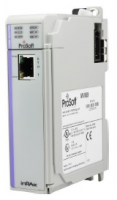
      The MVI69E-GEC Generic ASCII Ethernet Interface module is designed to allow CompactLogix™ / MicroLogix™ processors to interface easily with ASCII devices using the TCP/IP protocol. Compatible devices may be either ASCII instruments with built-in Ethernet or Ethernet connection via a thin server to the existing ASCII device.

      Five servers and Clients are present on the module permitting both the reception and transmission of data between the Rockwell Automation processor and attached devices.

      The MVI69E-GEC module is a powerful communication interface for CompactLogix / MicroLogix processors. Developed under license from Rockwell Automation, the module incorporates proprietary backplane technology that enables powerful data access between the module and the CompactLogix / MicroLogix processor.

      • Funktionen und Vorteile
      • Technische Daten
      • Hardware-Spezifikationen
      • Downloads
      • Videos
      • Zertifikate

      Funktionen und Vorteile

      • Single-slot - 1769 backplane compatible
      • The module is recognized as an Input/Output module and has access to processor memory for data transfer between processor and module
      • Ladder Logic is used for data transfer between module memory and processor controller tags. A sample ladder file with AOI is included
      • Configuration data obtained from configuration text file downloaded to module.
      • Supports CompactLogix and MicroLogix 1500 LRP Controllers except 1769-QBFC1B, 1769-L16x, and 1769-L18x

      Technische Daten

      Functional Specifications

      • Five servers and Clients to receive and/or transmit data
      • 10/100 Base-T Ethernet-compatible interface
      • Configurable parameters
        • Service port number
        • Connection timeout
        • Close type
      • Simple ladder logic operation
      • Setup and monitoring through ProSoft Configuration Builder (PCB)
      • CompactLogix backplane interface via I/O access
      • Each server monitors
        • State
        • IP and port number of connected Client
        • Error codes
      • Each Client monitors
        • State
        • IP and port number of connected server
      • ASCII character strings up to 4096 characters in length supported
      • User-definable module memory usage, supporting the storage and transfer of up to 4000 bytes to/from the control processor
      • Module error and status conditions returned to processor for diagnostic purposes
        • Module status
        • Port error status word (bitmapped)
        • Port receive state
        • Port receive character count
        • Port receive block count
        • Port transmit state
        • Port transmit character count
        • Port transmit block count
      • All data related to the module is contained in a single controller tag with defined objects to simplify monitoring and interfacing with the module
      • Module communication data is transferred to the MVI69E-GEC via a pre-defined user data type in the processor

      Hardware-Spezifikationen

      Specification

      Description

      Dimensions

      Standard 1769 Single-slot module

      Current Load

      500 mA max @ 5 VDC

      Power supply distance rating of 4

      Operating Temp.

      32° F to 140° F (0° C to 60°C)

      Storage Temp.

      -40° F to 185° F (-40° C to 85° C)

      Relative Humidity

      5% to 95% (with no condensation)

      LED Indicators

      Configuration Status

      Application Status

      Backplane Connectivity Status

      Module Status

      Debug/App Port

      10/100 Ethernet Port (Auto-negotiating)

      Downloads

      MVI69E-GEC Datasheet 346,03 kB Zuletzt geändert 09.12.2022
      MVI69E-GEC User Manual 2,72 MB Zuletzt geändert 23.11.2023
      MVI69E-GEC EDS Files 1,07 kB Zuletzt geändert 28.02.2020
      MVI69E-GEC Sample Ladder 782,13 kB Zuletzt geändert 28.02.2020
      ProSoft Configuration Builder
      ProSoft Discovery Service
      Technical Note - Migrating from MVI69-GEC to MVI69E-GEC 893,50 kB Zuletzt geändert 03.11.2020
      Technical Note - Using the 1769-AENTR with MVI69EL modules 2,13 MB Zuletzt geändert 02.07.2019
      MVI69E CAD Drawings (STEP) 363,42 kB Zuletzt geändert 15.09.2023
      LifeCycle Letter MVI69E MVI69L 106,93 kB Zuletzt geändert 08.08.2025

      Videos

      Understanding Client, Server & I/O Messaging for Ethernet Networks

      Data Organization in ProSoft Modules and Gateways

      Guide to bit-level data addressing in ProSoft Modbus modules

      Guide to 32-bit data types in ProSoft Modbus modules

      Zertifikate

      ATEX Letter of Conformity 104,30 kB Zuletzt geändert 12.05.2022
      CB Safety 340,17 kB Zuletzt geändert 28.02.2020
      Declaration of Conformity (RoHS/CE) 442,90 kB Zuletzt geändert 18.12.2020
      UL/cUL; Class 1, Div. 2 1,20 MB Zuletzt geändert 31.08.2021
      Country Approval - Eurasian Customs Union Conformity (EAC) (Wired) 1,92 MB Zuletzt geändert 10.07.2020
      Declaration of REACH Compliance 377,25 kB Zuletzt geändert 18.12.2025

Solutions

  • Amusement
  • Automated Material Handling
  • Automotive
  • IIoT Solutions
  • Mining and Metals
  • Modernization
  • Oil and Gas Solutions
  • Secure Remote Connectivity
  • Water & Wastewater
$(document).ready(function(){ $('.popup-youtube, .popup-vimeo, .popup-gmaps').magnificPopup({ disableOn: 700, type: 'iframe', mainClass: 'mfp-fade', removalDelay: 160, preloader: false, fixedContentPos: false }); //pagelayout banner? if($('.banner-image') !== 'undefined' ){ var banner_image_src = $('.banner-image img').attr('src'); $('.banner-image').hide(); $('.banner-page-title').css('background-image', 'url(' + banner_image_src + ')'); $('.banner-page-title').css('background-repeat', 'no-repeat'); } //if( $('.analytics-file-download' ) !== 'undefined' ) { // $('.analytics-file-download' ).click(function(){ // var action = $( this ).attr( 'href' ); // var label = $( this ).attr( '_gaq-label' ); // var category = $( this ).attr( '_gaq-category' ); // return ga('send', 'event', category, action, label); // }); //} //initialize search? $("#div_search_field input").focusin(function(){ $(this).css("color", "#000000"); }); var initialSearch = $('form.search input.text').attr("value"); var currentSearch = ""; $('form.search input.text').focusin(function(){ currentSearch = $('form.search input.text').attr("value"); if( currentSearch == initialSearch ) { $('form.search input.text').attr("value",""); } }); }); //Homepage slideshow if( $('#slider') !== 'undefined' ) { $('#slider').nivoSlider({ pauseTime: 7000 // time for a slide to show, in milliseconds; subtract 2 seconds for actual time due to transition time }); } //eZ Live Viewer //(function(){var ff=document.createElement('script');ff.type='text/javascript';ff.async=true;ff.src=('https:'==document.location.protocol?'https':'http')+'://liveviewer.ez.no/statjs/sst-118-973155090/stat.js';var s=document.getElementsByTagName('script')[0];s.parentNode.insertBefore(ff,s);})(); // Pardot integration piAId = '281892'; piCId = '1546'; (function() { function async_load(){ var s = document.createElement('script'); s.type = 'text/javascript'; s.src = ('https:' == document.location.protocol ? 'https://pi' : 'http://cdn') + '.pardot.com/pd.js'; var c = document.getElementsByTagName('script')[0]; c.parentNode.insertBefore(s, c); } if(window.attachEvent) { window.attachEvent('onload', async_load); } else { window.addEventListener('load', async_load, false); } })();