



• English
  • 中文
  • Français
  • Deutsch
  • Español
Contact Us
Home
Email
Follow Prosoft Technology on Twitter
Follow Prosoft Technology on Facebook
Follow Prosoft Technology on LinkedIn
Follow Prosoft Technology on YouTube
    • PROFINET Controller Module for ControlLogix®
    • EtherNet/IP™ to DH+ Gateway
    • Two-Port Building Automation Gateway
  • Solutions
    • Amusement
    • Automated Material Handling
    • Automotive
    • IIoT Solutions
    • Products for Rockwell Automation Platforms

      Produkte

      • Fernzugriff
      • Rockwell Automation In-chassis
      • Gateways
      • Industrial Wireless
      • ProSoft-Software
      Rockwell Automation In-chassis  >  DNP3 Ethernet Module for ControlLogix®
      Find a Distributor Request Pricing
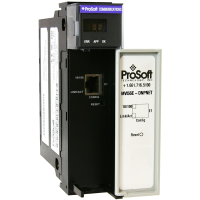
      MVI56E Product Photo - DNPNET

      DNP3 Ethernet Module for ControlLogix®

      MVI56E-DNPNET

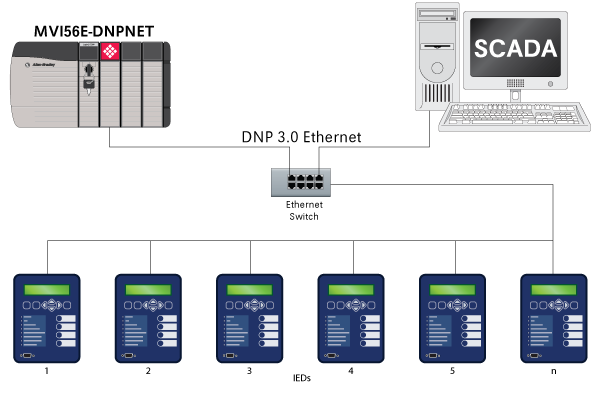
      The MVI56E DNP3 Ethernet Communication Module allows Rockwell Automation ControlLogix ® PACs to interface on a DNP3 Ethernet network. The module supports operation as an Ethernet Client with up to 40 DNP3 Ethernet server devices such as RTU's, IED's, and various protection relays. With support for 300 user definable commands and a maximum of up to 20,000 points of data, the module can be used to obtain data from a network of devices over a DNP3 Ethernet link.

      Additionally the module can simultaneously operate as a DNP3 Ethernet server allowing the unit to interface to other client devices such as SCADA and DCS systems using the DNP3 protocol. With a large event data storage for up to 20,000 time stamped events, the module will buffer event data during a loss of communications with the DNP3 client device, reporting this information when communications has been re-established.

      The module utilizes an Add-On Instruction in RSLogix 5000 for the configuration and setup of the module, allowing configuration data to be stored in the PAC ladder code. Remote diagnostics of the unit can be performed using the ProSoft Configuration Builder utility or through controller tags available in RSLogix 5000.

      A conformal coating option is available for this product.

      • Abbildungen
      • Funktionen und Vorteile
      • Technische Daten
      • Hardware-Spezifikationen
      • Downloads
      • Videos
      • Zertifikate

      Abbildungen

      Click on image(s) to enlarge
      Drag with the mouse. Click for close.

      Funktionen und Vorteile

      The module utilizes an Add-On Instruction in RSLogix 5000 for the configuration and setup of the module, allowing configuration data to be stored in the PAC ladder code. Remote diagnostics of the unit can be performed using the ProSoft Configuration Builder utility or through controller tags available in RSLogix 5000.

      Technische Daten

      • Single-slot 1756 ControlLogix backplane compatible
      • 10/100 Mbps auto crossover detection Ethernet configuration and application port
      • User-definable module data memory
      • CIPconnect-enabled network diagnostics monitoring using ControlLogix 1756-ENxT and 1756-CNB modules and EtherNet/IP pass-through communication
      • Add-On Instructions (AOI) are used for data transfer between module and processor
      • ProSoft Discovery Service (PDS) software used to locate the module on the network and assign temporary IP address

      Hardware-Spezifikationen

      Specification

      Description

      Backplane Current Load

      800 mA @ 5 V DC
      3 mA @ 24 Vdc

      Operating Temperature

      0° to 60°C (32° to 140°F)

      Storage Temperature

      -40° to 85°C (-40° to 185°F)

      Shock:

      30g Operational
      50g non-operational

      Vibration

      5 g from 10 Hz to 150 Hz

      Relative Humidity

      5 to 95% (non-condensing)

      LED Indicator:

      Battery Status (ERR)
      Application Status (APP)
      Module Status (OK)

      4-Character Display

      Shows Module IP Address

      Ethernet Port

      10/100 Base-T, RJ45 Connector, for CAT5 cable
      Link and Activity LED indicators
      Auto-crossover cable detection

      Shipped with Unit

      5-foot Ethernet straight-through cable

      Downloads

      MVI56E-DNPNET Datasheet 243,12 kB Zuletzt geändert 09.12.2022
      MVI56E-DNPNET User Manual (PDF) 3,11 MB Zuletzt geändert 06.01.2026
      MVI56E-DNPNET Sample Ladder & Add-On Instruction 199,26 kB Zuletzt geändert 05.02.2026
      MVI56E-DNPNET EDS file 725 B Zuletzt geändert 05.02.2026
      Technical Note - Migrating from MVI56-DNPSNET to MVI56E-DNPNET 1,42 MB Zuletzt geändert 03.11.2020
      ProSoft Configuration Builder
      Conformal Coating Option 2,14 MB Zuletzt geändert 18.05.2020
      MVI56E CAD Drawings (STEP) 11,16 MB Zuletzt geändert 15.09.2023
      LifeCycle Letter MVI56E Series 150,72 kB Zuletzt geändert 01.04.2026

      Videos

      Understanding Client, Server & I/O Messaging for Ethernet Networks

      Setup Tutorial for DNP3 over Ethernet ControlLogix® module as a Client

      Setup Tutorial for DNP3 over Ethernet ControlLogix® module as a Server

      Data Organization in ProSoft Modules and Gateways

      Guide to bit-level data addressing in ProSoft Modbus modules

      Guide to 32-bit data types in ProSoft Modbus modules

      Zertifikate

      CB Safety 504,75 kB Zuletzt geändert 06.10.2021
      IECEx 162,02 kB Zuletzt geändert 25.05.2016
      Declaration of Conformity (RoHS/CE) 136,60 kB Zuletzt geändert 20.01.2023
      ATEX Letter of Conformity 101,65 kB Zuletzt geändert 12.05.2022
      UL CoC 83,45 kB Zuletzt geändert 23.06.2020
      Korean KC Registration 185,94 kB Zuletzt geändert 11.09.2020
      Declaration of REACH Compliance 388,80 kB Zuletzt geändert 18.12.2025
      Country Approval - Eurasian Customs Union Conformity (EAC) (Wired) 1,92 MB Zuletzt geändert 10.07.2020

Solutions

  • Amusement
  • Automated Material Handling
  • Automotive
  • IIoT Solutions
  • Mining and Metals
  • Modernization
  • Oil and Gas Solutions
  • Secure Remote Connectivity
  • Water & Wastewater
$(document).ready(function(){ $('.popup-youtube, .popup-vimeo, .popup-gmaps').magnificPopup({ disableOn: 700, type: 'iframe', mainClass: 'mfp-fade', removalDelay: 160, preloader: false, fixedContentPos: false }); //pagelayout banner? if($('.banner-image') !== 'undefined' ){ var banner_image_src = $('.banner-image img').attr('src'); $('.banner-image').hide(); $('.banner-page-title').css('background-image', 'url(' + banner_image_src + ')'); $('.banner-page-title').css('background-repeat', 'no-repeat'); } //if( $('.analytics-file-download' ) !== 'undefined' ) { // $('.analytics-file-download' ).click(function(){ // var action = $( this ).attr( 'href' ); // var label = $( this ).attr( '_gaq-label' ); // var category = $( this ).attr( '_gaq-category' ); // return ga('send', 'event', category, action, label); // }); //} //initialize search? $("#div_search_field input").focusin(function(){ $(this).css("color", "#000000"); }); var initialSearch = $('form.search input.text').attr("value"); var currentSearch = ""; $('form.search input.text').focusin(function(){ currentSearch = $('form.search input.text').attr("value"); if( currentSearch == initialSearch ) { $('form.search input.text').attr("value",""); } }); }); //Homepage slideshow if( $('#slider') !== 'undefined' ) { $('#slider').nivoSlider({ pauseTime: 7000 // time for a slide to show, in milliseconds; subtract 2 seconds for actual time due to transition time }); } //eZ Live Viewer //(function(){var ff=document.createElement('script');ff.type='text/javascript';ff.async=true;ff.src=('https:'==document.location.protocol?'https':'http')+'://liveviewer.ez.no/statjs/sst-118-973155090/stat.js';var s=document.getElementsByTagName('script')[0];s.parentNode.insertBefore(ff,s);})(); // Pardot integration piAId = '281892'; piCId = '1546'; (function() { function async_load(){ var s = document.createElement('script'); s.type = 'text/javascript'; s.src = ('https:' == document.location.protocol ? 'https://pi' : 'http://cdn') + '.pardot.com/pd.js'; var c = document.getElementsByTagName('script')[0]; c.parentNode.insertBefore(s, c); } if(window.attachEvent) { window.attachEvent('onload', async_load); } else { window.addEventListener('load', async_load, false); } })();