






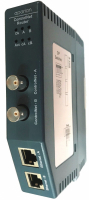
ControlNet Router
A-CNR
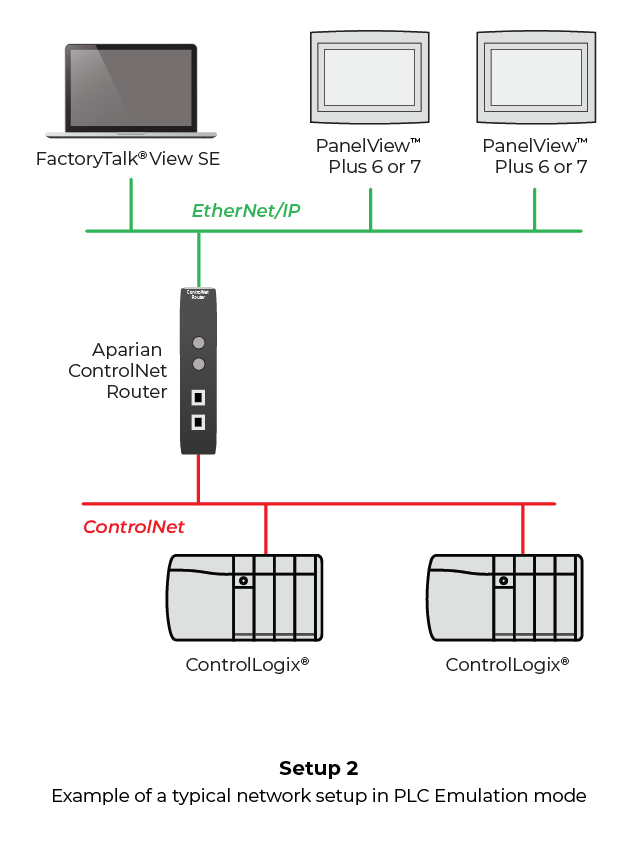
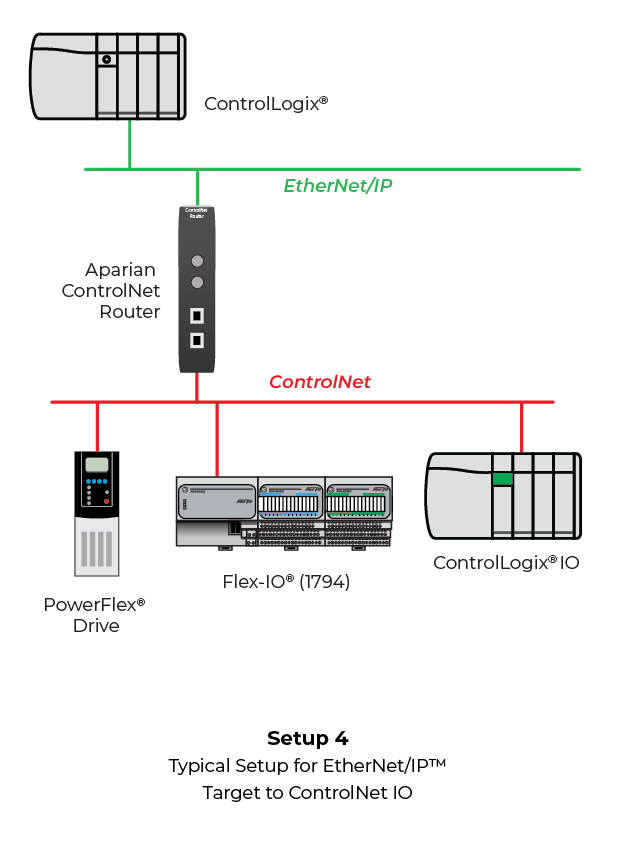
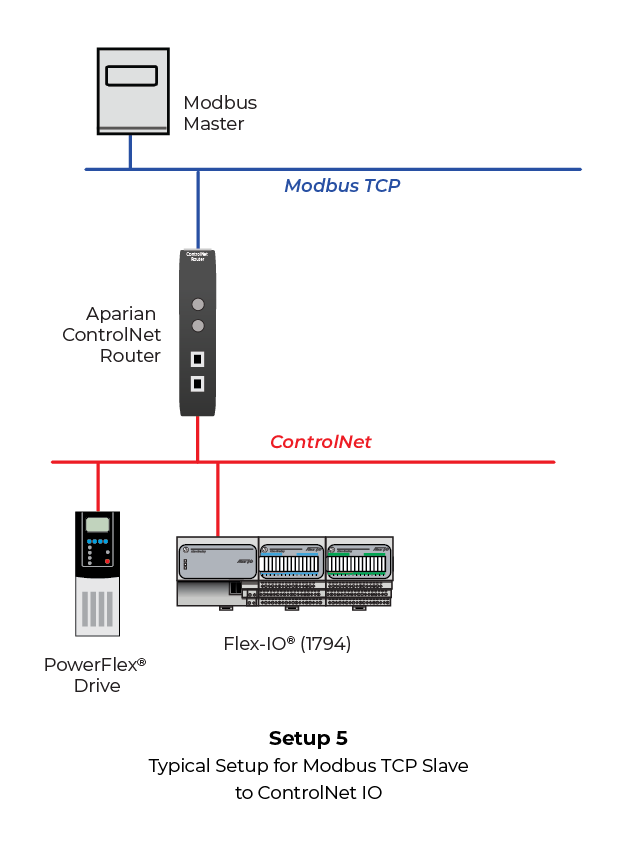
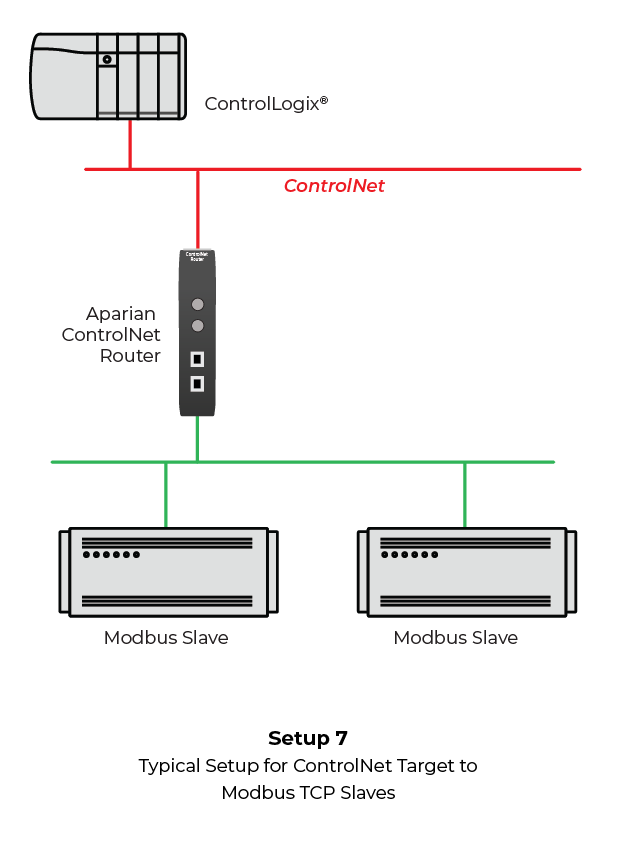
The A-CNR ControlNet Router provides an efficient method of bridging between ControlNet and Ethernet networks. The module provides intelligent routing between EtherNet/IP or Modbus TCP/IP and a ControlNet network. The module can be configured as a ControlNet Target or an Originator. As a ControlNet target, a Logix controller can own the ControlNet router using a scheduled connection. As a ControlNet originator, the module can be configured to own ControlNet I/O or exchange data with up to 10 ControlNet devices.
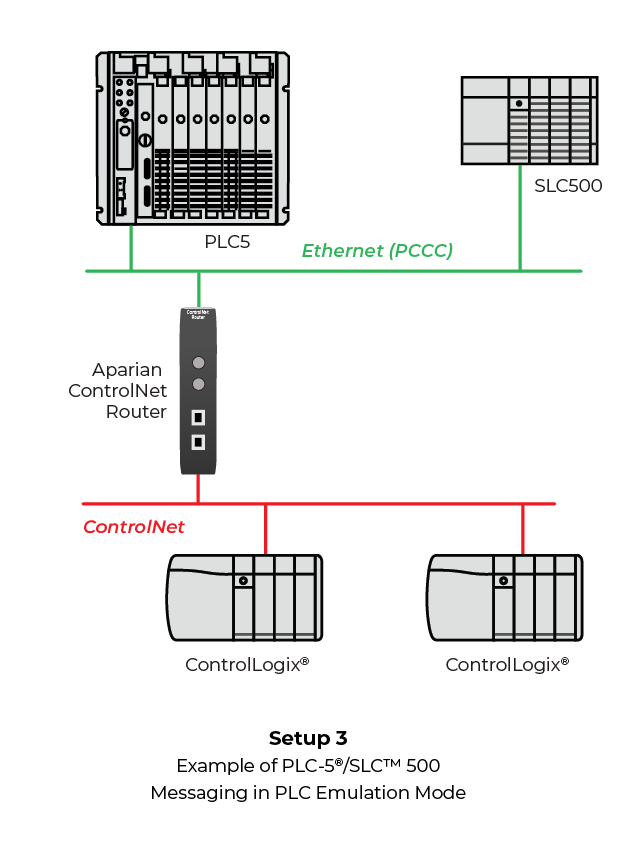
The module can also be configured as a PCCC Client (allows the module to emulate a PLC5 or SLC5 providing legacy interface to PanelViews), EtherNet/IP target or originator, and as Modbus TCP/IP client or server.
As an EtherNet/IP target, a Logix controller can own the router using a Class 1 connection. As an EtherNet/IP originator, the router supports class 1 connection or explicit messaging.
As a Modbus TCP/IP client, the router can map ControlNet data to Modbus registers for exchange with Modbus TCP/IP servers. As a Modbus TCP/IP server, the router can exchange the ControlNet data with Modbus TCP/IP clients.
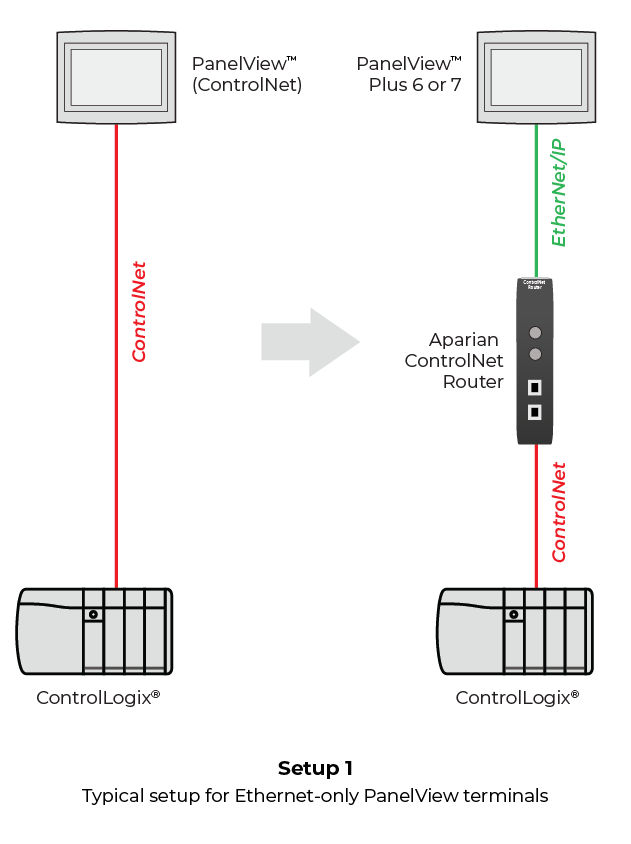
The I/O data can be accessed via Ethernet using either the PCCC or EtherNet/IP™ or Modbus TCP/IP protocols. The support for PCCC protocol allows the module to emulate user-defined PLC5-type data files data simplifying the migration to Ethernet-only PanelViews. The module also provides a range of statistics on Ethernet and ControlNet to assist with fault finding.
A built-in webserver provides detailed diagnostics of system configuration and operation, including the display of ControlNet operation and communication statistics, without the need for any additional software.
- Abbildungen
- Funktionen und Vorteile
- Konfiguration
- Technische Daten
- Hardware-Spezifikationen
- Downloads
- Zertifikate
Abbildungen
|
|
|
|
|

|
|
Funktionen und Vorteile
- Own ControlNet I/O enabling the migration from legacy Logix systems/controllers to newer EtherNet/IP Logix platforms, without replacing the existing ControlNet I/O.
- Can be configured as a ControlNet Target or Originator.
- Can operate as ControlNet Keeper.
- Supports Promiscuous Capture mode allowing the ControlNet Router to capture all traffic on the ControlNet network.
- Can be configured as an EtherNet/IP Target or Originator.
- Can be configured as a Modbus TCP/IP Client to exchange ControlNet data with Modbus TCP/IP servers.
- Can be configured as Modbus TCP/IP Server to exchange ControlNet data with Modbus TCP/IP clients.
- Connect Ethernet-only PanelViews to Logix via ControlNet.
- Supports Scheduled & Unscheduled ControlNet for PanelViews.
- Program Logix controllers via ControlNet.
- Supports Redundant ControlNet and Ethernet.
- Advanced Diagnostics, including packet capture and webserver.
Konfiguration
The Slate Configuration Utility software is used for configuration and troubleshooting of the module. The stand-alone configuration utility allows users to define the setup and configuration of the ControlNet router, connections with controllers and devices.
The configuration utility can be downloaded from the "Downloads" section.
Technische Daten
EtherNet/IP Network
| Specification |
Description |
| Connector |
RJ45 |
| Conductors |
CAT5 STP/UTP |
| ARP Connections |
100 max. |
| TCP Connections |
100 max. |
| CIP Connections |
50 max. |
| Communication Rate |
10/100 Mbps |
| Duplex Mode |
Full / Half |
| Auto-MDIX Support |
Yes |
| Embedded Switch |
Yes, 2 x Ethernet ports |
| Device Level Ring (DLR) |
Yes |
| Network Time Protocol |
Yes |
ControlNet Network
| Specification |
Description |
| Connectors |
2 x BNC (ControlNet A, B) |
| Conductors |
Quad shield RG-6 coaxial cable |
| Routing (via RSLinx programming) |
Yes |
| Redundancy |
Yes |
ControlNet Target
| Specification |
Description |
| Scheduled Connection Size |
Max. Input size – 408 bytes (400 bytes of mapped data) Max. Output size – 404 bytes (400 bytes of mapped data) |
| Unscheduled Routed Clients |
40 max. |
| Scheduled Connection Count |
1 |
ControlNet Originator
| Specification |
Description |
| Scheduled Connection Count |
10 max. |
| Scheduled Connection Data |
Input Connection Data: Max. 500 bytes per connection. |
| Explicit Unscheduled Connections |
10 max. |
| Multiple ControlNet Connection Originators |
Supported |
PCCC
| Specification |
Description |
| PCCC Connections |
10 max. |
| PCCC Payload |
1000 bytes max. |
EtherNet/IP Target
| Specification |
Description |
| Class 1 Connection Size |
Max. Input size – 500 bytes (492 bytes of mapped data) Max. Output size – 496 bytes (492 bytes of mapped data) |
| Class 1 Connection Count |
1 |
| Class 3 Messaging Support |
Yes |
| UCMM Messaging Supported |
Yes |
EtherNet/IP Originator
| Specification |
Description |
| Class 1 Cyclic Connection Supported |
Yes |
| Class 3 UCMM Connections Supported |
Yes |
| Class 1 Connection Count |
10 |
| Class 3 UCMM Connection Count |
10 |
| Class 3 UCMM Mapping Count |
50 |
| Direct-To-Tag Logix Support |
Yes |
Modbus TCP/IP Client
| Specification |
Description |
| Server Devices |
20 max. |
| Modbus Mappings |
100 max. per server device |
| Mapping Ranges |
0 to 65535 |
| Base Offset |
Modbus (base 0); PLC (base 1) |
| Configurable Modbus TCP/IP Port |
Yes |
| Data Re-formatting Supported |
BB AA |
Modbus TCP/IP Server
| Specification |
Description |
| Mapping Ranges |
0 to 65535 |
| Base Offset |
Modbus (base 0), PLC (base 1) |
| Configurable Modbus TCP/IP Port |
Yes |
Hardware-Spezifikationen
| Specification |
Rating |
|
| Power Supply |
Input: 10 to 36 VDC, (85 mA @ 24 VDC) |
|
| Power Consumption |
2.0 W (max) |
|
| Dimensions (H x W x D) |
149.0 x 34.0 x 116.0 mm |
|
| Connector |
3-way terminal |
|
| Conductors |
24 to 18 AWG |
|
| Enclosure Rating |
IP20, NEMA/UL Open Type |
|
| Temperature |
-20 to 70 °C |
|
| Earth Connection |
Yes, terminal based |
|
| Emissions |
IEC 61000-6-4 |
|
| ESD Immunity |
EN 61000-4-2 |
|
| Radiated RF Immunity |
IEC 61000-4-3 |
|
| EFT/B Immunity |
IEC 61000-4-4 |
|
| Surge Immunity |
IEC 61000-4-5 |
|
| Conducted RF Immunity |
IEC 61000-4-6 |
|
Zertifikate
| ODVA Certification | 598,63 kB | Zuletzt geändert 28.09.2020 |
| UL/cUL; Class1, Div 2 | 238,99 kB | Zuletzt geändert 25.01.2024 |
| ATEX Letter Of Conformity | 100,69 kB | Zuletzt geändert 26.10.2023 |
| CE Declaration of Conformity (CE, UKCA, RoHS, UL) | 570,54 kB | Zuletzt geändert 26.06.2026 |